
Suunto Race 2 Watch
The TLDR review: great hardware but the UI and software leave a lot to be desired.

Background
I’ve been a GPS smart watch user since 2009, going way back to the Garmin Forerunner 305. Since then, I’ve been exclusively a Garmin Forerunner wearer, largely because they’re built for triathletes and Garmin customer service is excellent. I currently have a Garmin Forerunner 965 and it’s not without issues (I’m on my 4th 945/965 since 2022 – all warrantee replacements due to defective sensors, which is a pretty bad track record). So when Suunto offered me their Race 2 watch to review, I was super excited, hoping this would be a great alternative to Garmin’s offerings.
About me. I’ve got 18 years as a competitive triathlete. I’m also a triathlon coach. I see a LOT of training data and I’ve got a pretty decent baseline for how I feel a watch should operate and I know what features triathletes need in a reliable watch. I’m also an engineer and I currently work in IT, so I’m pretty well versed in technology, programming, and user interface (UI) design.
For my testing of the Suunto Race 2 watch, I went full nerd and wore ALL the technology for 6+ weeks Ra: Garmin Forerunner 965, Suunto Race 2, and Whoop 5. It looked nerdy, but it was all in the name of quality gear testing. Full disclosure: I also decided that I didn’t want a month-long data gap in my Garmin or Whoop data, so wearing everything was just as much of a lifestyle choice as it was for gear reviewing. My last triathlon race was at the end of July, so during my review, I was more in the “using my fitness for FUN” part of my year. During testing, I pool swam, biked (gravel + MTB), ran, hiked, lifted weights, and did yoga. I was able to connect my power meters to the Suunto as well as load gpx maps for navigation. The only thing missing from my review was open water swimming or an actual triathlon, but I don’t love open water swimming, and I felt that I had enough info from my other activities to do a thorough review.

left: Whoop 5, Garmin Forerunner 965
right: Suunto Race 2
About the Suunto Race 2
There are a TON of features and things to list about the Suunto Race 2, but here’s the highlights. For a full summary, head to their website.
- Long battery life: up to 55 hours in performance mode (best GPS accuracy) and up to 200 hours in tour mode (lower GPS accuracy, heart rate off). Battery life lasts up to 16 days as a watch (with heart rate on).
- 115+ sports included in the tracking menu. The most random one I found was something called “mermaiding”. If it’s an activty, chances are, that category exists in the Suunto menu.
- Free, downloadable GPS base maps that are saved into the watch memory
- Ability to download gpx routes directly to the watch and use them for route planning and navigation
- Suunto coach insights, giving feedback on workout intensity, recovery, and training recommendations
- Dimensions: 49 x 49 x 12.5 mm / 1.93 x 1.93 x 0.49 inches
- Weight: 76 g / 2.68 oz
- Glass: sapphire glass
- Display size: 1.5 inches
- Activity tracking (RHR, HRV, sleep, steps)

Photo credit: Jack Zakrajsek
What I Liked
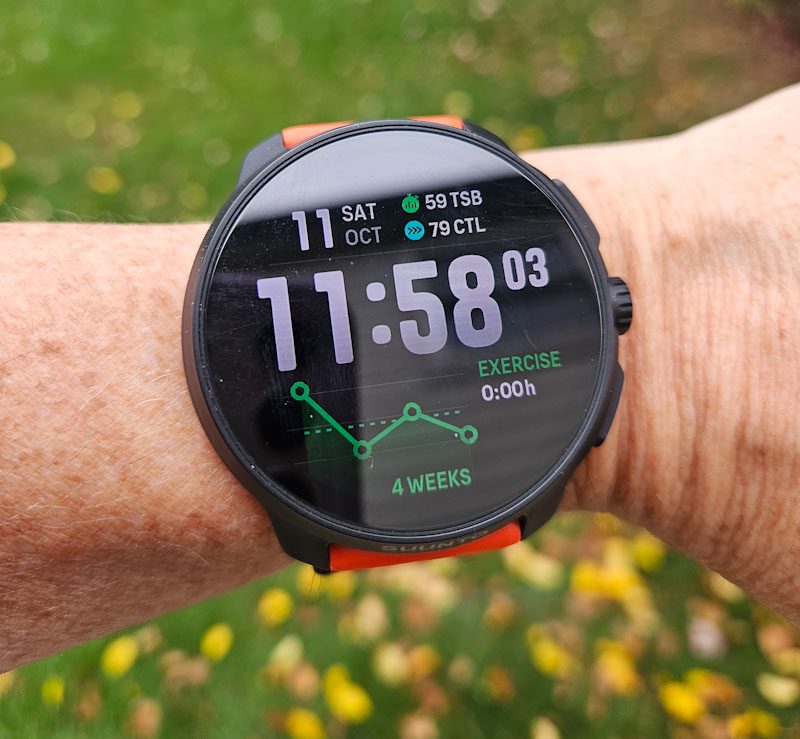
The watch feels good on and has an excellent AMOLED screen. The numbers pop, the screen is plenty big, and the watch “wakes” up really quickly (which is helpful when you are moving and need to glance at your watch display for a data check).
Pairing my other technology was really simple. Both of my power meters connected easily and were easy to bring up for subsequent rides. Paring to my phone (Samsung S23) was also simple.
I really love being able to export a route from Strava, Map My Ride, etc and save it directly to the Suunto Race 2 via the Suunto app. I had a weekend that involved a few ride options and I wasn’t sure which rides I was actually going to do. Before I left my house, I downloaded all of the event routes to my watch. The download process was really simple and the routes were saved to the watch super quick. When I was starting my ride, selecting the route to use was also very easy and simple.
I found the GPS data to be very accurate. I did a LOT of traveling during my testing and I found that elevation was more accurate on the Suunto than on the Garmin. This was especially evident when I was in Ohio for a weekend. My Garmin thought I was 300 ft higher than reality and the elevation gain during my MTB ride (yes, a MTB ride in Ohio) was WAY off reality. The Suunto Race 5 was spot-on for altitude and the recorded elevation gain matched my post-ride Strava corrected data from the Garmin.
The heart rate sensor was also really accurate. The activity data recorded by the Suunto Race 2 matched up well against both my Garmin and Whoop devices. Additionally, HRV and RHR values also matched up well against my other devices.
And a more “random” category, I really liked the Suunto Race 2 flashlight mode. Two button pushes to get to the Flashlight and the entire watch screen turns white until it times out or you turn it off. I used this feature a TON and it’s crazy how handy it is. I had several weekends of camping and flashlight mode was plenty bright when fumbling around my dark van, inside a pit toilet, or walking back from the Roam Fest neon dance party to camp. It’s definitely easier to use and brighter than Garmin’s flashlight offering.

Right: Garmin Forerunner 965 and Whoop 5
What I Thought was Just Ok
Admittedly, part of my initial struggle with the Suunto Race 2 was the change in ecosystem. It’s similar to being a life-long Apple user and then getting an Android-based phone or Windows computer. The learning curve was, in my opinion, STEEP. This was sometimes due to differences in language and phrasing (Suunto is based in Finland) and this was sometimes due to poor UI design. Often, I had to head to the internet to search for “how to do X” because the UI wasn’t easy to figure out. And often, features I was expecting to see, just aren’t available or are available but in a very basic form.
I would say that the Suunto UI is very “spartan” or basic. There’s not a lot of customization that the user can do and there aren’t a lot of options for things that I would consider basic features.
Part of the learning curve was figuring out the terminology. For example, the watch face is pretty basic. To customize the data fields, you need to select “complications”. But once you get to that menu, you can only customize 2 data fields on the watch face and those options are pretty limited. Another terminology example: if you want to review your training history, you need to select “logbook” from the menu.
The quick menu options are fairly limited as well and not hugely customizable, i.e. you aren’t able to pick specific data snapshots that float to the top of the at a glance menu. If I wanted to see my sleep, HRV, average HR, etc, I was required to click through a few menus to get to that information. It got annoying, especially since I’m used to being able to see a wide range of data snippets on the Garmin glance menu.
The weather function is also really not that helpful. Often, I’ll be packing my gym bag in the evening before bed for the next day (I swim before work and then head to the office). I don’t watch the news anymore but I also ike to make sure that I’m packing weather appropriate clothing in my gym bag. I’m usually upstairs and away from my phone, but I can easily get a but I like seeing what the weather snapshot is for the next day (or days). My Garmin will show me the current weather, hourly for the next 12 hours (enough to tell me if it was too cold to swim outside), and the daily stats for the next 4 days. Super helpful. The Suunto UI will only show me the next 6 hours, which at 9 PM only gets me to 3 AM and is wholly unhelpful for planning my next day.
The alarm function is too basic for my liking. I have a different wake-up schedule based on the day of the week. Suunto’s alarm options are once, weekday, or daily. I ended up not using the alarm function because I don’t have the mental bandwidth to remember to turn the alarm on or off each night to accommodate my varying (but routine) schedule.
The “Resources” calculation is basically Suunto’s representation of a recovery score or training readiness. During my testing of the Suunto Race 2, I also wore my Garmin Forerunner 965 and Whoop 5. Taking into account that there is a “getting to know you” phase for any device to gain baseline metrics, I found that overall, the Suunto recovery calculations were out of line and overly optimistic compared to my other devices. HRV/RHR measurements were relatively consistent across the three devices. I found that Suunto wasn’t great in tracking sleep (I always wake up at least once to use the bathroom, Suunto never picked this up once in 6+ weeks of testing). And generally, Suunto gave me a full Resources rating, even on days where my HRV and RHR was indicating I was in rough shape. Based on my research. Suunto relies heavily on the athlete’s feedback on every workout (when you save the workout, you provide feedback on how you felt). If you say you felt “excellent”, Suunto skews your readiness on the high end, ignoring the other data metrics. I’m the kind of athlete that generally always feels at least good when I work out, so using a very biased self-metric as the groundwork for an objective calculated metric meant to inform athletes isn’t great.
The Suunto app is fairly basic and I wish it did more in terms of allowing me to customize the watch through the app versus through the phone. One feature Suunto has built into the app is a very Strava-like taking someone’s activity and posting it to the app. I have my settings set to private. But – and this was kind of horrifying – users who did not set their data to private had their workouts posted for anyone to see. The Suunto app showed (I think) any users who were geographically close to me in the Activities menu. I was seeing activities of complete strangers who seemed to be doing activities close to me. The scary part is that there is no way to auto-hide your start/end position. This means that random Suunto users can figure out where other random Suunto users live. I wonder if the people who have their data public are aware of this safety issue. Again, some programming would help this functionality safer to use.
The most annoying of the “just ok” category was the sports selection menu. I do a LOT of activities (I have 13 on my Garmin quick menu). The Suunto Race 2 pulls your most recent activity to the top (which is really the bottom on the menu the way the scroll feature works). Everything else just kind of shuffles off into the sunset in the order it was last used. And there are also a LOT of sports programmed in the display – most of which weren’t relevant for me and created mental clutter. Worse, if you click on a sport out of curiosity (i.e. “mermaiding”) you are forever stuck with that sport on your quick menu as there is no way to remove it.
The UI as a whole seems really clunky and not intuitive, at least for me. Often, I’d figure out how to find a function or menu (usually after searching on the internet) and if I didn’t use that function for a while, it would take a while for me to figure out where it was hidden. There are a LOT of submenus to the Suunto Race 2 UI and the mapping of things isn’t always intuitive. For example, I shouldn’t have to go online to figure out how to set the do not disturb modes or to figure out how to mute the beeps. Maybe with more time with the watch it would get easier, but I didn’t find the UI to get much more intuitive after 6 weeks of use.
Are any of these things deal breakers? No. But are these things REALLY annoying? Absolutely.
My Deal Breakers
Plural, unfortunately. And they’re all due to software programming and a less than desirable UI.
Beeps and Notifications
This was a right out of the box annoyance. I like to have my watch connected to my phone for notifications. It’s really handy to see what alerts come across my phone when I don’t have my phone nearby (this feature on my Garmin has saved me from being late to many a meeting when I’ve wandered away from my desk). So, it’s my first day with the Suuno and I’ve got the notifications turned on. I go into a work meeting and my watch is beeping up a storm. Every notification gets a beep. And there didn’t appear to be an easy or obvious way to mute them.
Once I was home and had more time, I had to head to the Suunto help forums and internet searches to figure out how to get the beeping to stop. Yes, even muting things isn’t intuitive. What I found what that Suunto UI only lets you either have ALL of the beeps on or ALL of the beeps off. OR a work around is to just have the Do Not Disturb function turned on all of the time (and then you have to disable it when you actually want to hear beeps). I chose to mute them because I cannot have my watch beeping during work meetings. An alternative would be to just disable the notifications entirely, but then I wouldn’t get to use a feature that I really find helpful in my daily life.
I usually like to have the beeps on when I hit start/stop/lap on an activity, just as an audible confirmation that I hit the correct button. Because I needed to mute the sounds, I don’t get that audible confirmation. Its annoying, but not exactly a deal breaker.
The all or nothing approach on the muting of sounds became an issue when I was using the route function on one of my MTBs rides. I wanted to see how the Suunto navigation was as part of my testing. I did a MTB ride with the gpx route loaded. Getting the route on the watch and selecting it was easy. However, once I was actually on the trail and riding, the mute all the beeps issue came back in full force. Since I had muted all of the alerts, this meant that the navigation never audibly alerted me to any of the turns that I needed to take to stay on course. I was on a mountain bike, riding technical singletrack. There was absolutely no way I was going to take my eyes off of the trail and look at a 1.5″ watch display to see if I had a turn coming up. I needed the audible alerts to help me navigate. A more flexible UI and software design would make it possible for me to select which notifications I want to hear.
Pool Swimming
I’ve been a competitive swimmer for most of my life. I don’t need a watch to count my laps for me but I do like having the watch record my swims and autosave them into Strava and Training Peaks for me. I like having the training metrics autosaved and I like that things like distance, pace, and heart rate are accurate. This information goes into my weekly training load and is much more accurate (and easier) than me hand typing distance and total swim time into my training logs.

Suunto Race 2 left, Garmin Forerunner 965 right
How the Suunto Race 2 handles pool swimming was my deal breaker in deciding that I’m sticking with my Garmin Forerunner 965. Neither watch does a 100% accurate job of tracking distance in the pool. They both have problems with drill and kick sets. Garmin knows this is a problem and has built in software functionality that allows the user to select “drill mode” mid-swim, which lets the user manually add in the kick/drill data. You can also use drill mode at the end of the swim (i.e. cool down) if you notice that your total distance is wonky, to make sure that the data is correct when it’s saved and loaded into your training apps. Suunto has offers no such work around. The watch had a hard time recognizing various strokes other than freestyle, had issues with drill sets (both resulted in inaccurate distances). Kick sets resulted in zero distance recorded. So if you swim a variety of things – like the majority of swimmers and triathletes do – you total swim distance will be erroneous when you hit save and it gets loaded into training apps. The very manual workaround is that the user goes into the apps and corrects the data or just doesn’t save the data and manually adds it in later.
Considering this is a $500 watch aimed at triathletes, it really should do a better job in making sure your pool swim data is accurate. Correcting the data mid-workout is possible via software programming, yet Suunto has elected to not give users that option.
Closing Thoughts
The Suunto Race 2 watch is so close, yet so far away from being a solid alternative to Garmin as a triathlon watch. The hardware is great. The watch looks and feels great. The data that it records is accurate. The battery life is solid. And I LOVE the map and navigation options.
Where Suunto falls behind is in their UI design. It’s not great, at least for this US-based triathlete. Opportunities for the user to customize the features and functionality are very limited. Basic things seem to be buried under several menu options. The menus are not intuitive, even after 6 weeks of use.
I think the Suunto Race 2 watch is fantastic if you are an athlete who primarily runs or cycles and for those who do not want a lot of features or customization to your watch. It isn’t for someone who swims in the pool or for someone who likes to customize settings.
For $500, I would expect that the user experience pretty closely matches other similarly priced GPS smart watches. A better UI design and some software modifications would elevate the Suunto Race 2 and make it more competitive against similarly priced Garmin options.
Erin Trail
Trail Boss of Stoke


Erin is a former Montana park ranger with a degree in environmental engineering. She loves getting into technical details while putting her gear (and herself) through the paces. She shares her home in Colorado with her husband, Will, and her 3 cats (Zipper, Brewtus, and Simcoe).


Leave a Reply